
Ritual MCP server
The Ritual MCP server exposes Ritual product data to AI tools through the Model Context Protocol (MCP). Any client that supports MCP over HTTP (for example Cursor, Claude Code, or VS Code with an MCP extension) can call Ritual tools and read Ritual resources using an API key you create in Ritual.
Ritual’s MCP integration is server-first today: external agents connect to Ritual to read workspace context. Separately, the Ritual platform can connect out to your own MCP servers (such as Confluence or Google Drive) for knowledge sources; that path is managed inside Ritual and is not something you configure in your IDE.
Who can use this
- You need a Ritual account with access to the workspaces whose explorations you want to expose.
- Create an MCP API key from Integrations → Developer → Ritual as an MCP server (see Create an MCP API key). Keys are scoped (for example read vs read/write) and respect workspace access.
- Your editor or agent runtime must support remote MCP over HTTPS (Streamable HTTP). Local stdio-only servers are a different integration pattern; Ritual’s hosted endpoint is HTTP.
What you can do with Ritual MCP
Once connected, your agent can:
- Discover explorations — Semantic search across explorations you can access (
find_explorations). - Inspect an exploration — Titles, status, questions, and summaries (
get_exploration). - Pull requirement packages — Design or code specs as markdown (
get_requirement_package). - Read execution planning — High-level planning status or the full plan with dependencies and gates (
get_planning_state,get_planning_full). - Load recommendations — Approved strategy and recommendation content (
get_recommendations). - List workspaces — See which project workspaces the key can use (
list_workspaces). - Browse MCP resources — Structured URIs for workspaces, explorations, and artifacts (see Resources below).
Typical workflow for implementation work: search for the right exploration, then fetch requirement and planning tools before writing code so the plan matches what your team already approved in Ritual.
Hosted endpoint
The Ritual MCP server is available at:
https://mcp.ritualql.com/mcp
Use this URL as the MCP HTTP endpoint (POST /mcp). Send the API key on every request as a Bearer token (see Authentication). Your client may expose this as Authorization headers in MCP server config.
Dedicated or private-cloud deployments may use a different base URL provided by your organization. The Integrations page shows the endpoint that matches your environment under MCP Server Configuration—prefer that value when it differs from the URL above.
Create an MCP API key
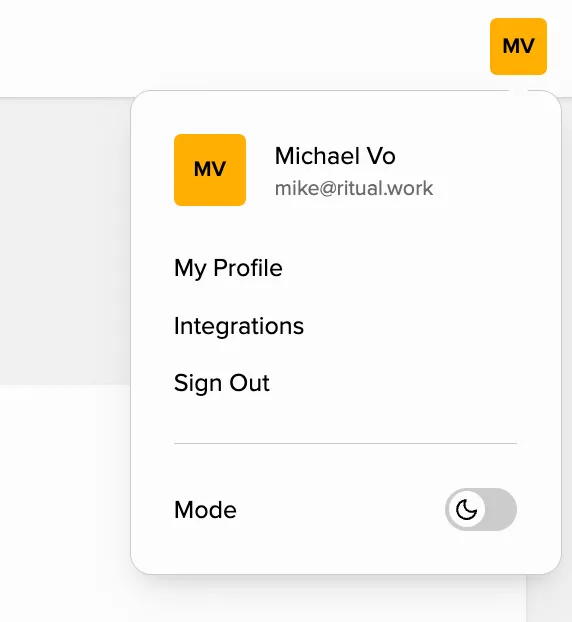
- Open Integrations (API & MCP) in your browser, or click your profile (avatar) in the top-right corner and choose Integrations.
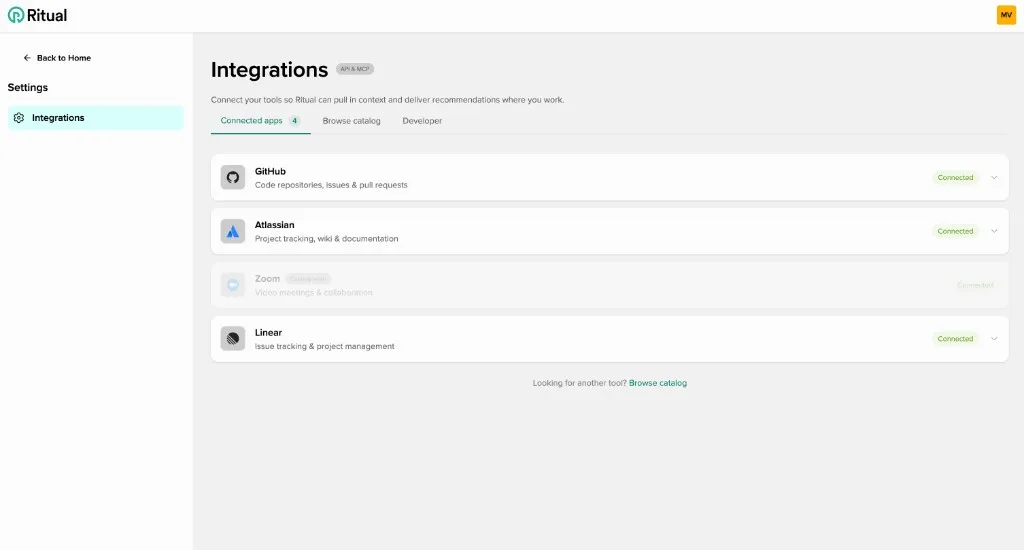
- Select the Developer tab. (The Connected apps and Browse catalog tabs are for other integrations.)
-
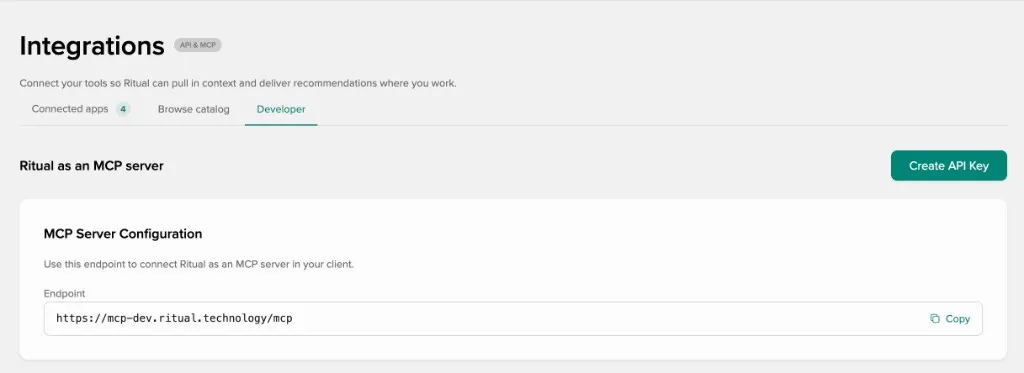
Under Ritual as an MCP server, click Create API Key. Pick a scope when prompted (for example read to start). Copy the key immediately and store it somewhere safe—it may not be shown again.
-
In MCP Server Configuration, copy the Endpoint shown there into your MCP client. That URL is tied to your Ritual environment. For the standard production service it matches the URL in Hosted endpoint; if your screen shows a different host, use the value from the app.
Authentication
Every MCP request must include your API key:
- Header:
Authorization: Bearer <your_key>(keys often start withrtl_). - URL: Use the MCP endpoint from Hosted endpoint, or the Endpoint field on the Integrations → Developer page if your organization uses another host.
The server validates the key with Ritual’s API and applies rate limits that depend on key scope (per-minute and per-day caps). Invalid or missing keys are rejected.
Connect from your editor
Configuration differs by client; all follow the same idea: HTTP MCP server URL + Bearer token.
Claude Code
Use the CLI or a project .mcp.json so the server persists (for example --scope user or --scope project). Example:
claude mcp add-json --scope project ritual '{"type":"http","url":"https://mcp.ritualql.com/mcp","headers":{"Authorization":"Bearer rtl_YOUR_API_KEY_HERE"}}'Equivalent .mcp.json fragment:
{
  "mcpServers": {
    "ritual": {
      "type": "http",
      "url": "https://mcp.ritualql.com/mcp",
      "headers": {
        "Authorization": "Bearer rtl_YOUR_API_KEY_HERE"
      }
    }
  }
}
Cursor, VS Code, and other MCP clients
Add a server entry of type HTTP / Streamable HTTP pointing at the same /mcp URL and set the Authorization header to Bearer <key>. Follow your client’s MCP documentation for the exact JSON or UI fields.
Anthropic Messages API (MCP connector)
If you build on Anthropic’s API rather than an IDE, you can attach remote MCP servers that speak HTTPS MCP. Ritual’s endpoint can be used as that remote server; you pass the MCP URL and an OAuth or Bearer-style token as your integration allows. See Anthropic’s MCP connector documentation for mcp_servers, toolsets, and beta headers. Note their current limitations (for example tooling-focused connector, no local stdio in that path).
Tools
These tools are exposed to clients that complete the MCP handshake. Names match what agents invoke.
| Tool | Purpose |
|---|---|
ping | Health check. |
find_explorations | Search explorations (semantic search; natural-language queries supported). |
get_exploration | Detailed exploration metadata, questions, and answers. |
get_requirement_package | Design or code requirement package as markdown. |
get_planning_state | Compact execution-plan status (counts, version, compilation state). |
get_planning_full | Full execution plan: groups, items, dependencies, gates, conflicts. |
get_recommendations | Strategic recommendations for an exploration. |
list_workspaces | Workspaces visible to the API key. |
Additional write tools may be introduced for broader scopes (read_write, admin) as Ritual expands MCP capabilities.
Resources
MCP resources complement tools with stable URIs (for clients that list or read resources):
| URI pattern | Content |
|---|---|
ritual://workspaces | Accessible workspaces. |
ritual://workspace/{workspaceId}/explorations | Explorations in a workspace. |
ritual://exploration/{explorationId} | Full exploration detail. |
ritual://exploration/{explorationId}/artifact/{artifactType} | Generated requirement package in markdown; {artifactType} is typically design or code (same as get_requirement_package package types). |
Replace {workspaceId}, {explorationId}, and {artifactType} with values from your Ritual data.
Limitations and expectations
- Protocol: Hosted Ritual MCP uses HTTP (Streamable HTTP), not a local stdio process. Align your client with that transport.
- Scope: Tooling focuses on reading exploration and planning context; mutating Ritual through MCP depends on key scope and future tools.
- Search:
find_explorationsuses semantic retrieval; exact keyword matches are not required. - Third-party MCP in Ritual: Connecting Confluence, Drive, Jira, etc. inside the Ritual app uses Ritual’s own MCP client path; you do not paste those server URLs into the Ritual MCP server section above—that is a different product flow (Connected Servers / knowledge sources).
Related reading
- Ritual AI Security & Privacy Practices — how AI and data handling are approached in the product.
- Security & Privacy — broader platform practices.
- Model Context Protocol — MCP specification and concepts.
- Anthropic MCP connector — using remote MCP from the Messages API.
Deployment details, outbound MCP client APIs, and infrastructure notes for Ritual’s MCP stack live in the ritual-mcp-server repository for operators and integrators.